Deckbuilder 2.0
Legacy Product Redesign
UX / Product Design · Product Improvement · Spec Creation · Figma Prototyping
Overview
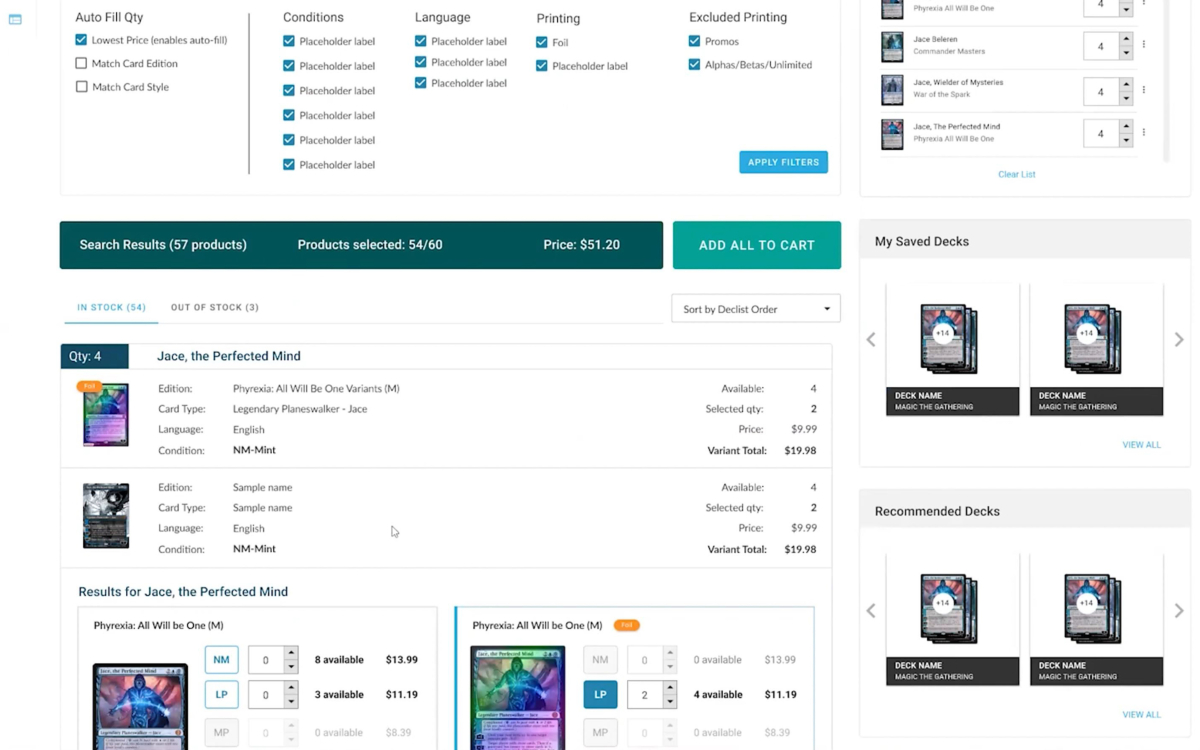
Deckbuilder 2.0 was a redesigned deck-building tool for the game and hobby industry, particularly collectible card games such as Magic: The Gathering.
The experience was designed to let users paste or upload a list of cards they were looking for, automatically search a retailer’s inventory, review and filter results, adjust quantities, and then use the completed list for actions such as purchasing items, saving a wishlist, or creating a buylist.
The project was an upgrade from an older legacy deckbuilder and was intended to provide a much more capable, modern experience that better matched current user expectations and the functionality of the newer ecommerce platform.
My Role
I worked as a designer on the project in close collaboration with another designer.
My work included:
- Gathering and organizing requirements from meetings and other project inputs
- Structuring the project, specifications, user stories, and acceptance criteria in Aha!
- Conducting market and user research collaboratively
- Contributing to UX concepts, layouts, and interaction solutions
- Creating and refining Figma components
- Designing interface layouts and user flows
- Building and refining interactive prototypes
- Tracking project progress and outstanding requirements
- Exploring error handling and recovery experiences
- Contributing feedback and design thinking during prototype reviews and demonstrations
- Creating supporting video and handoff materials
I handled much of the specification and requirements organization, along with project setup and tracking in Aha!. The visual design, layouts, UX solutions, research, and parts of the prototyping were collaborative.
The Challenge
The project needed to replace an outdated legacy experience with a more flexible and capable tool while supporting the realities of the collectible-card market.
Users often build decklists using a variety of third-party tools and websites, which can produce lists in different formats and with different kinds of information. The new experience needed to make it easier to bring those lists into a retailer’s ecommerce site, match them against available inventory, resolve problems, and continue toward a useful next step.
Some of the primary UX challenges included:
- Defining the main user workflows for searching and building a list
- Supporting different decklist formats from outside systems
- Determining how imported information should be interpreted and matched against retailer inventory
- Designing clear results and filtering experiences
- Handling missing or unmatched items
- Giving users understandable ways to resolve errors or incomplete results
- Supporting different actions after a list had been created
- Improving the overall speed, clarity, and flexibility of the legacy experience
Approach
I began by gathering the available project information and organizing the requirements in Aha!, including specifications, user stories, acceptance criteria, and open questions.
We also reviewed existing products and market approaches to understand how other deck-building tools handled imports, card matching, filtering, and related workflows.
From there, I structured the Figma workspace around the primary user flows and major parts of the experience. We worked first on the overall layout and architecture, then moved into individual features, interactions, states, and edge cases.
The design developed iteratively as we explored different ways to organize the interface, present search results, support multiple list formats, and communicate problems clearly when the system could not find an exact match.
Key UX Considerations
Legacy Product Improvement
A major goal was to move beyond the limitations of the older deckbuilder rather than simply recreating it in a newer interface.
The redesigned experience introduced more flexible workflows, clearer results, better handling of incomplete or problematic inputs, and more options for what users could do with a completed list.
Flexible List Input
Users could arrive with decklists created in a variety of external systems, each of which might format card information differently.
Designing around that variability required thinking through how users would provide a list, how the system would interpret it, and what should happen when some information could not be matched cleanly.
Error Handling and Recovery
Missing or unmatched items were an important part of the experience.
Rather than treating these cases as simple failures, the UX needed to explain what had happened and provide clear ways for the user to understand and resolve the problem.
Results and Filtering
Once inventory matches were found, users needed a clear way to review results, filter available options, adjust quantities, and make decisions about which items to include.
Multiple Next Steps
The completed list was not limited to a single outcome. Depending on the user’s goal, it could support actions such as purchasing items, saving a wishlist, or creating a buylist.
That required the experience to remain understandable even as the workflow branched into different possible outcomes.
Iteration
Layouts, capabilities, interaction patterns, and individual states went through multiple iterations as the project developed and we evaluated different ways to make the experience clearer and more efficient.
Deliverables
The project produced:
- Organized project specifications
- User stories and acceptance criteria
- Market and user research
- UX and interface designs
- Figma components
- Interactive Figma prototype
- Presentation and demonstration materials
- Narrated product demo
- Developer handoff materials
Outcome
The project requirements were translated into an approved, usable Figma prototype.
Compared with the legacy deckbuilder, the redesigned experience supported a broader range of list formats, more capable search and result handling, clearer error-recovery experiences, improved presentation of matching inventory, and more options for what users could do with a completed list.
The project was reviewed by leadership and approved.
Tools
Figma · Aha! · Adobe Premiere Pro
Public Project Demo
The public demonstration shows the collaboratively designed prototype and the upgraded deck-building workflow, including the interface, list handling, inventory results, and interaction patterns developed for the project.
NOTE: The primary presenter in the demo video is my coworker, not me.
CONTACT ME
Feel free to get in touch via email.