Data Insights
Business Analytics Dashboard
UX / Product Design · Spec Creation · Information Architecture · Figma Prototyping
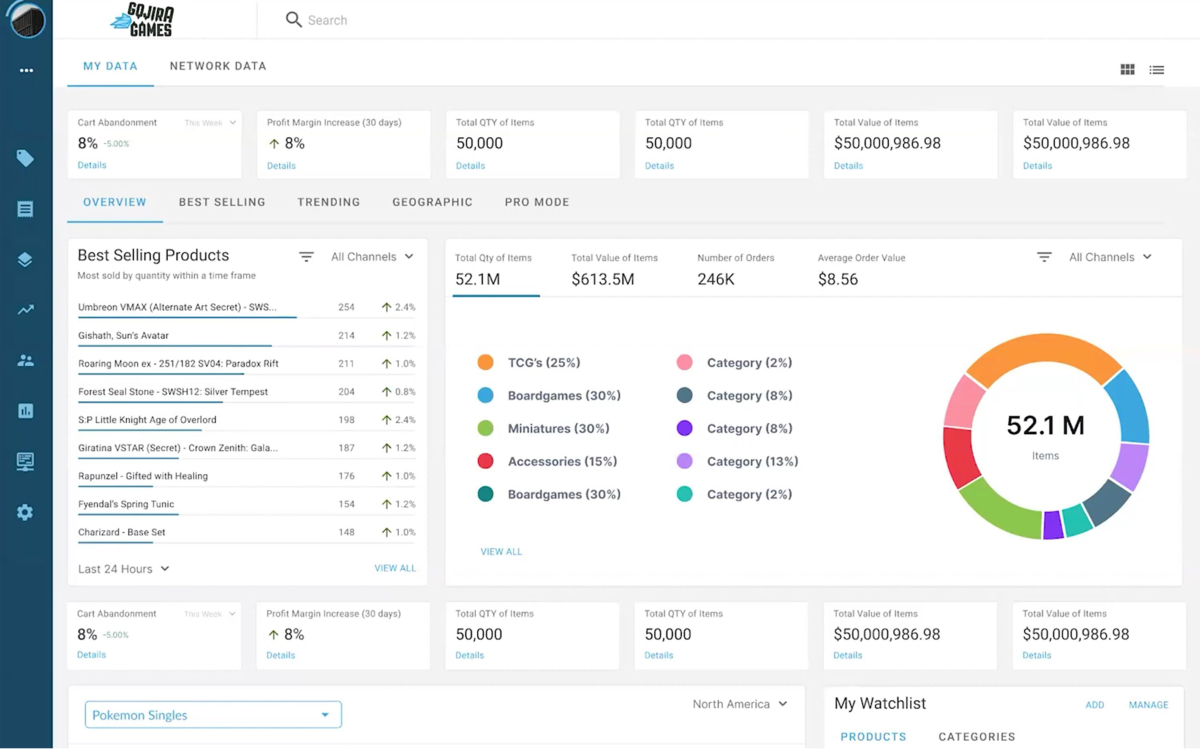
Overview
Data Insights was a business analytics dashboard designed for ecommerce retailers using the CrystalCommerce platform, along with related users such as manufacturers and distributors.
The goal was to make a wide range of business and platform data accessible through a single experience, including both individual-business data and aggregated platform data across different categories, views, and time ranges. The project also presented an opportunity to surface unique industry data available through the platform.
My Role
I co-designed the product with another designer and took a leading role in organizing the project requirements and specifications.
My work included:
- Gathering and organizing requirements from meetings and other project inputs
- Structuring the project, specifications, user stories, and acceptance criteria in Aha!
- Research and UX exploration
- Information architecture and navigation concepts
- Figma interface design and interactive prototyping
- Designing and refining reusable interface components
- Exploring layouts, widgets, interactions, and system feedback
- Presenting the prototype to leadership and a client
- Incorporating feedback through additional design iterations
- Preparing materials for developer handoff
- Creating and presenting a narrated product demonstration
The overall UX, layouts, and many of the interaction solutions were collaborative. I handled much of the specification and requirements organization, contributed heavily to the Figma components and UX concepts, and helped track the project as the design evolved.
The Challenge
The dashboard needed to organize a large amount of information without making the experience feel overwhelming.
Users needed to be able to explore different kinds of data, move between categories and views, change time ranges, and understand both their own business information and broader platform-level data.
Some of the primary UX challenges included:
- Defining a navigation architecture that could support a growing set of analytics
- Determining how different types of information should be grouped and accessed
- Creating flexible dashboard layouts for different types of widgets and data
- Designing clear interaction patterns and interface feedback
- Exploring multiple approaches to navigation, layouts, and data presentation
- Maintaining a cohesive experience as the number of features and views expanded
Approach
I began by gathering the available project information and organizing the requirements in Aha!, including specifications, user stories, acceptance criteria, and open questions.
From there, I structured the Figma workspace around the major parts of the product and worked on the overall page architecture before moving into individual widgets, features, and interactions.
The design developed iteratively. We explored different navigation models, layouts, widget formats, and interaction approaches as the requirements became more concrete.
Rather than treating the dashboard as a collection of individual screens, we worked through how the different pieces should function together as a coherent analytics experience.
Key UX Considerations
Information Architecture
A major part of the work involved determining how users would move through a large collection of analytics while keeping the structure understandable and scalable.
Data Presentation
Different types of information required different formats and visual treatments. We explored multiple widget and layout approaches to find ways of presenting complex information clearly.
Interaction and System Feedback
I paid close attention to the smaller details of how the interface communicates with the user — what happens when something is selected, changed, loaded, filtered, or otherwise interacted with.
Iteration
Navigation concepts, layouts, widgets, and individual interactions went through multiple versions as we reviewed the experience, received feedback, and identified better approaches.
Deliverables
The project produced:
- Organized project specifications
- User stories and acceptance criteria
- UX and interface designs
- Reusable Figma components
- Interactive Figma prototype
- Presentation and demonstration materials
- Narrated product demo
- Developer handoff materials
Outcome
The project requirements were translated into an approved, usable Figma prototype.
The prototype was presented to leadership and a client, feedback was incorporated through additional iterations, and the completed UX was prepared for handoff to a front-end development contractor.
The project also received positive feedback from leadership, a client, and the lead developer.
Tools
Figma · Aha! · Adobe Premiere Pro
Public Project Demo
The public demonstration shows the working prototype, design thinking, and collaborative review process. It also shows me presenting and explaining the UX, responding to questions and feedback, and discussing potential improvements in real time.
CONTACT ME
Feel free to get in touch via email.